Follow via RSS, Mastodon, Telegram or email.

On iOS it seems potentially useful to have app “suggestions” (some things are just easier to handle in a dedicated app than in a mobile browser) it doesn’t really make sense in Safari on macOS.

While other annoying features like websites offering push notifications have a “Don’t ask me again” button, there’s no such thing here. Uninstalling the app seems to be the most reasonable option.

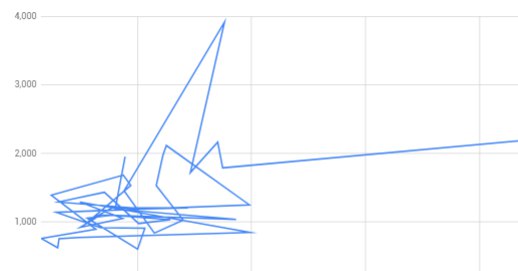
Yes, Google. This is exactly what I had in mind when I clicked the “Insert chart” button. The underlying data could not be more simple and linear, but of course I wanted this satanic symbol and not just a boring graph.

I’m a paying customer and already signed in, but yet I still have to read through the offer again and acknowledge once more that I’m ready to spend these 9.99 Euros every month. Not that I have a choice, as the only other button is a “Learn More” link.

Clicking on the “iTunes Store” in the Music.app sidebar changes the view to be a random Smart Playlist. Clicking it again will actually navigate to that Smart Playlist.

An imaginary reader might ask: “But how do you access the iTunes store then?“

I’m still investigating.

Storing your Photos.app library on an external disk, that you maybe want to unmount from time to time, was always really annoying. It’s constantly “analyzing” pictures for faces or transcoding videos even if you quit the app.

What’s new is that now the new Music.app that ships with macOS Catalina has the same behavior as apparently the AMPLibrary needs to do important things all the time now.

I guess I’ll just get used to “Force Eject”.

If you want to delete multiple playlists at once you have to right click every single one of them. Selecting multiple playlists with shift or cmd doesn’t work.

My mid 2014 MacBook Pro—while generally working very well for it’s age—is annoying me a little for the past year.

There seems to be an issue with the USB power supply where it’s not providing enough power for a SSD attached via USB. This only happens after it went to sleep once, and only if a peripheral device demanding more power was attached before.

It goes like this: After restarting the laptop I’m attaching the SSD to the USB port on the left side of the MBP and it works fine. Then I put the laptop to sleep, wake it up again and the SSD is not getting mounted. I plug it into the port on the right side and it works.

Now if I put it to sleep and wake it up again the port on the right is also not providing enough power any more. If I test the one on the left side now it’s also still not working.

The only solution is—as so often—to restart.